Table of Contents
Why Website Speed Still Matters in 2026
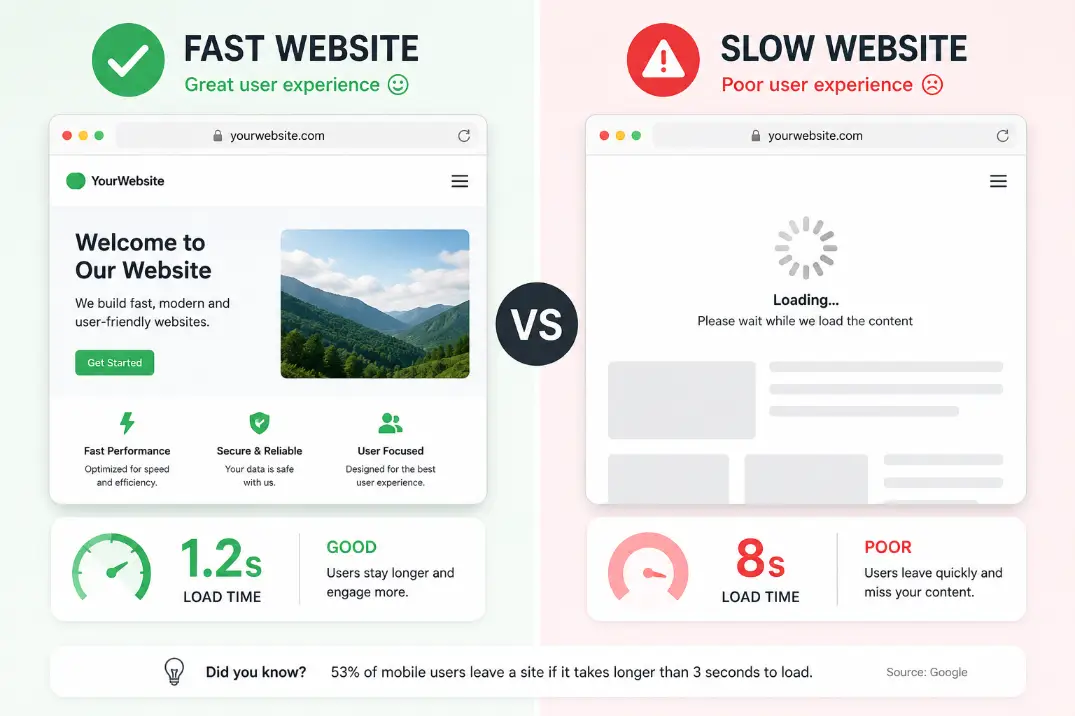
In 2026, website speed is no longer a "nice to have" — it's a hard requirement for survival online. Google's Core Web Vitals continue to be a direct ranking factor, meaning a slow website directly hurts your position in search results. Beyond SEO, user expectations have never been higher.
Studies consistently show that 53% of mobile users abandon a page that takes longer than 3 seconds to load. With the average global internet speed increasing year over year, your visitors have zero patience for sluggish websites. Every extra second of load time can reduce conversions by up to 7%.
Whether you run a personal blog, an eCommerce store, or a corporate website, optimizing your speed is one of the highest-ROI tasks you can do in 2026. The good news? You don't need to be a developer to implement most of these tips. Let's dive in.
Tip 1: Switch to a Faster Hosting Provider
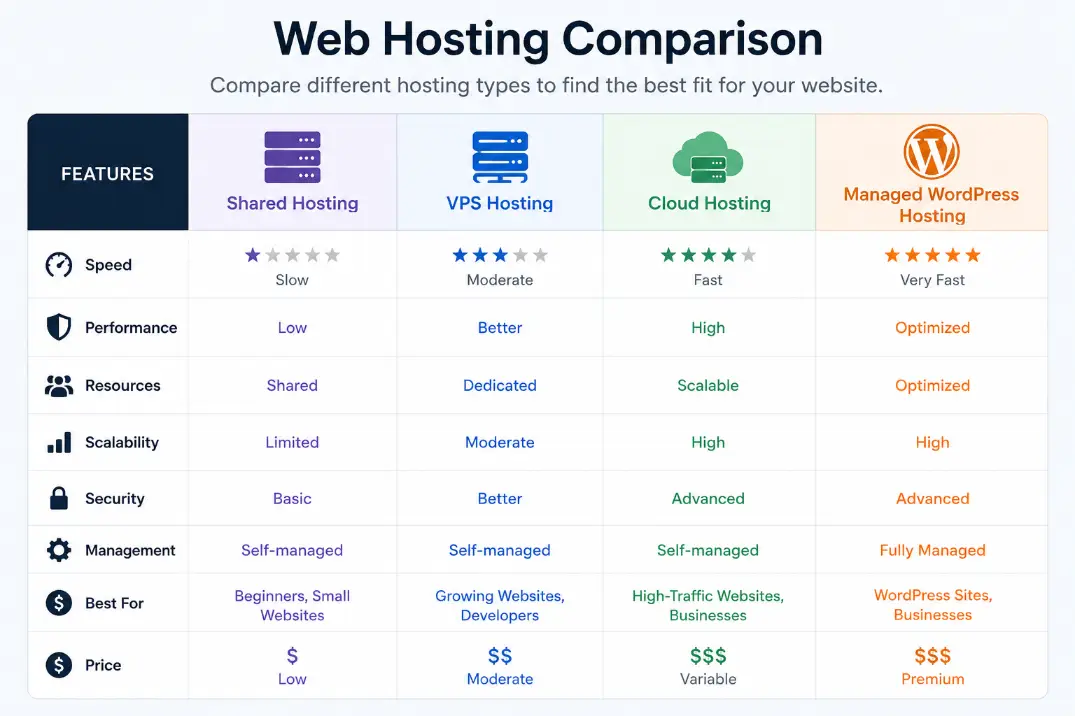
Your hosting provider is the foundation of your website's performance. If you're still on cheap shared hosting, you're likely sharing server resources with hundreds or thousands of other websites — and that kills speed.
What to do:
- Upgrade to cloud hosting (Google Cloud, AWS, or DigitalOcean) for scalable, dedicated resources.
- Consider Managed WordPress Hosting (like Kinsta or WP Engine) if you're running WordPress — they include built-in caching and performance optimizations.
- Look for hosts that use NVMe SSD storage, which is significantly faster than traditional SATA SSDs.
- Choose a host with server locations close to your target audience to reduce physical data travel time.
In 2026, the performance gap between budget shared hosting and quality cloud or managed hosting has never been wider. The investment pays for itself in better rankings and more conversions.
Tip 2: Enable Browser Caching
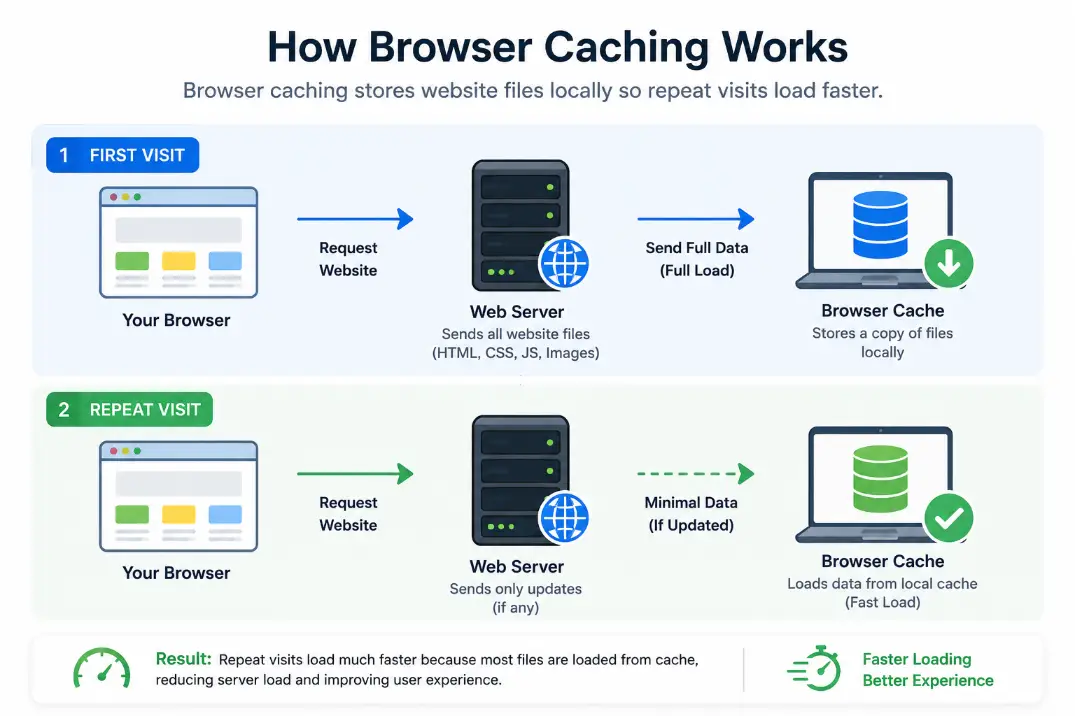
Browser caching tells a visitor's browser to store certain files locally so they don't have to be re-downloaded every single time someone visits your site. For returning visitors, this can reduce load times dramatically.
How to enable it:
- If you're on WordPress, plugins like W3 Total Cache or LiteSpeed Cache handle this automatically.
- For custom websites, add cache-control headers in your
.htaccessfile (Apache) ornginx.conf(Nginx). - Set cache expiration to at least 1 year for static assets like images, CSS, and JavaScript files that don't change often.
Browser caching is one of the easiest wins for repeat traffic. Once set up, it requires zero ongoing effort.
Tip 3: Optimize and Compress Images
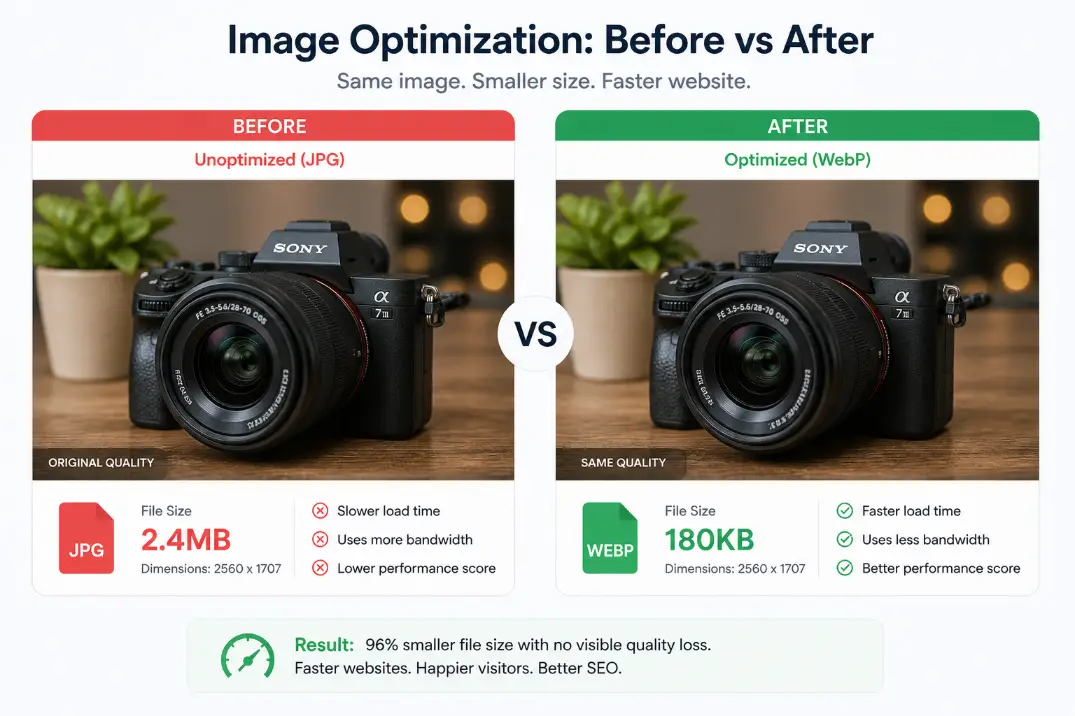
Images are often the single largest contributor to page size. In 2026, serving uncompressed JPGs and PNGs is like shipping a product in an oversized box — wasteful and slow.
Best practices for image optimization:
- Convert images to WebP or AVIF format — AVIF in particular can reduce file sizes by 50% compared to JPEG with no visible quality loss.
- Use tools like Squoosh, ShortPixel, or Imagify to batch compress your existing image library.
- Always specify image dimensions (width and height attributes) in your HTML to prevent layout shifts (which also hurts your CLS Core Web Vital score).
- Use responsive images with the
srcsetattribute so mobile users download smaller image sizes.
A simple image audit can often cut your total page weight by 40–60% overnight.
Tip 4: Use a Content Delivery Network (CDN)
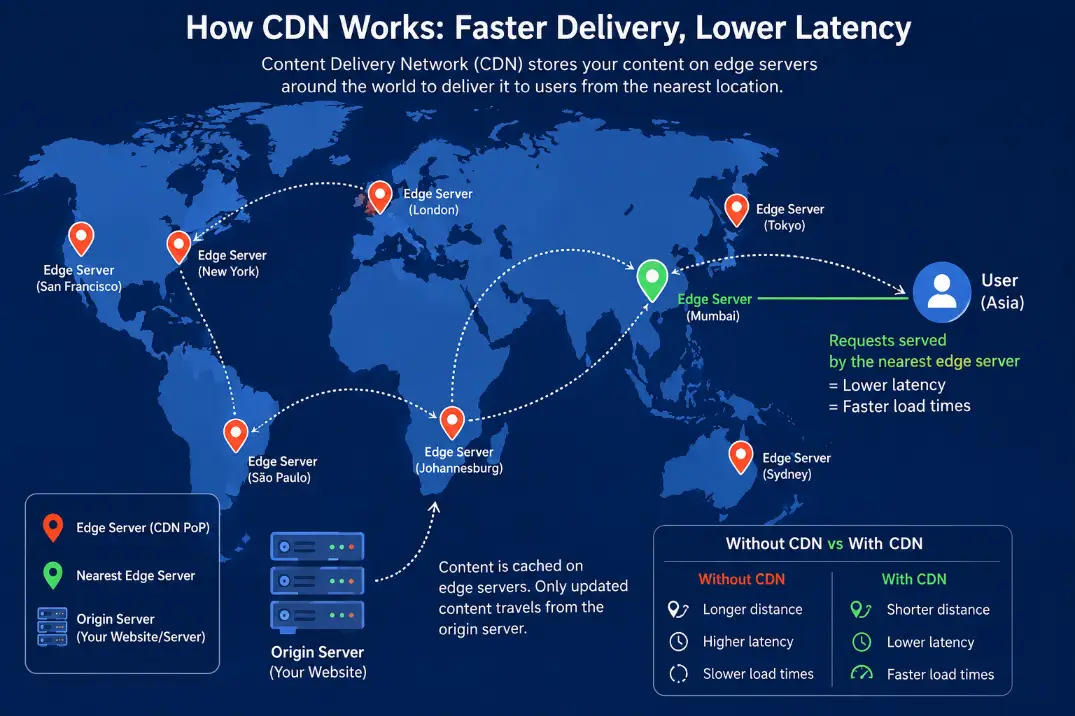
A Content Delivery Network (CDN) stores copies of your website's static files on servers located around the world. When a user visits your site, they receive data from the nearest server location, not your origin server thousands of miles away.
Top CDN options in 2026:
- Cloudflare — Free tier available; includes DDoS protection and performance optimizations.
- Bunny CDN — Excellent performance at a very low price.
- AWS CloudFront — Ideal for websites already hosted on AWS infrastructure.
CDNs dramatically reduce Time to First Byte (TTFB) — one of Google's key performance metrics. For globally reaching websites, a CDN is non-negotiable.
Tip 5: Minify CSS, JavaScript, and HTML
Every unnecessary space, comment, and line break in your code adds up. Minification strips out all of that extra data without changing how your code functions, reducing file sizes by 20–80%.
How to minify:
- WordPress users: Plugins like Autoptimize or WP Rocket minify and combine CSS/JS files automatically.
- Non-WordPress users: Use build tools like Webpack, Vite, or Parcel — these minify code as part of your deployment process.
- For HTML, tools like HTMLMinifier can strip whitespace from your markup.
This is a set-it-and-forget-it optimization that silently improves every page load.
Tip 6: Reduce HTTP Requests
Every element on your page — images, scripts, stylesheets, fonts — requires a separate HTTP request. The more requests, the longer your page takes to load. Cutting unnecessary requests is one of the most impactful speed improvements you can make.
Practical ways to reduce requests:
- Combine CSS and JS files where possible (your minification plugin often handles this too).
- Remove unused plugins and scripts — especially on WordPress, where plugins often load scripts on every page regardless of need.
- Replace icon fonts (like Font Awesome) with inline SVG icons, which load as part of your HTML.
- Audit third-party scripts (chat widgets, analytics, social embeds) — each one adds latency. Load them asynchronously or defer them.
Use Chrome DevTools (Network tab) or GTmetrix to see exactly how many requests your page is making and which ones are slowest.
Tip 7: Implement Lazy Loading
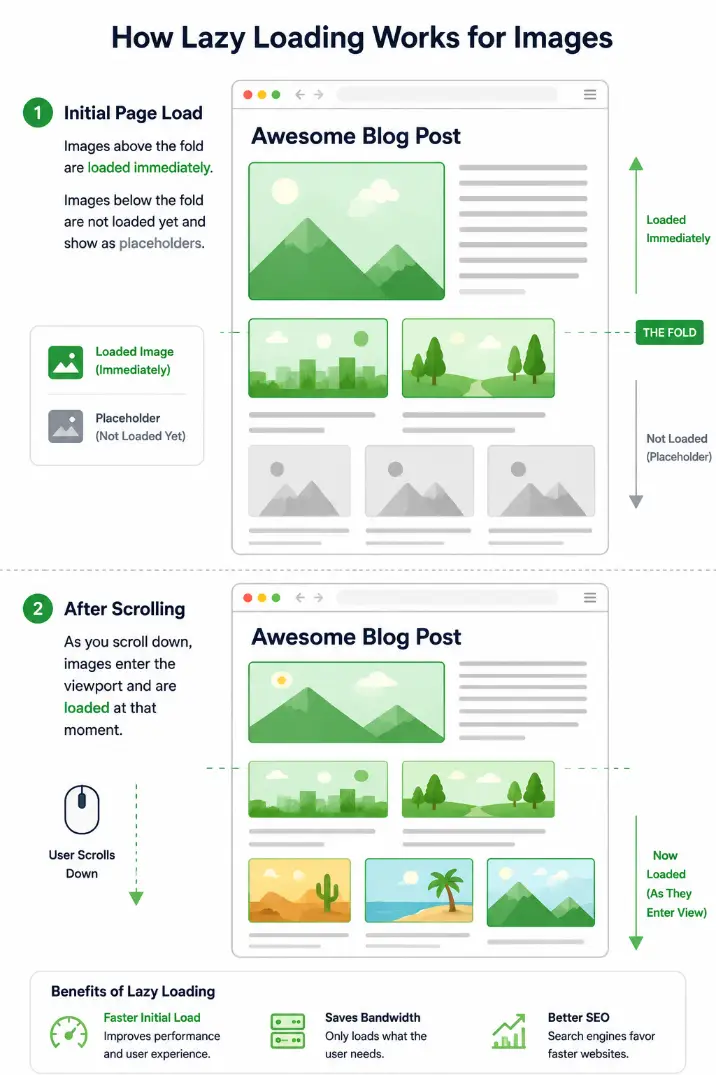
Lazy loading means that images and videos below the visible area (below the fold) are not loaded until the user scrolls down to them. This dramatically reduces initial page load time.
How to implement lazy loading:
- For images, simply add
loading="lazy"to your<img>tags — this is now natively supported in all modern browsers. - For WordPress, most modern themes and page builders support lazy loading out of the box.
- For iframes (YouTube embeds, maps), use a facade — a lightweight placeholder image that loads the real embed only when clicked. This alone can save hundreds of kilobytes.
Lazy loading is especially powerful for image-heavy pages like product listings, portfolios, and blogs.
Tip 8: Upgrade to HTTP/3
HTTP/3 is the latest version of the Hypertext Transfer Protocol, built on Google's QUIC protocol. Compared to HTTP/2, it offers significantly faster connection speeds, especially on mobile networks and high-latency connections.
Why HTTP/3 matters in 2026:
- Eliminates head-of-line blocking — a major bottleneck in older protocols.
- Establishes connections faster because it requires fewer round-trips.
- Performs better on unstable or lossy connections (mobile networks, rural broadband).
How to enable it:
- If you're using Cloudflare, HTTP/3 is enabled with one click in your dashboard.
- Major cloud hosting platforms (AWS, Google Cloud, Azure) all support HTTP/3 in 2026.
- Check support using online tools like http3check.net.
Most website owners don't realize HTTP/3 is available to them — turning it on is often a single checkbox.
Tip 9: Optimize Your Database
If your website uses a database (WordPress, WooCommerce, or any CMS), a bloated, unoptimized database slows down every query your site makes — and those queries happen on every page load.
Database optimization tips:
- Delete post revisions — WordPress saves a revision every time you hit "save." After years, this can add up to thousands of unnecessary rows.
- Remove spam and trashed comments — they occupy database space and slow queries.
- Clean up transients — expired transients (temporary cached data) accumulate over time.
- Use WP-Optimize or Advanced DB Cleaner (WordPress) to automate this cleanup monthly.
- For custom databases, run
OPTIMIZE TABLEcommands regularly to defragment tables.
A well-maintained database can reduce server response time by 20–40% on content-heavy websites.
Tip 10: Use Next-Gen Video and Font Optimization
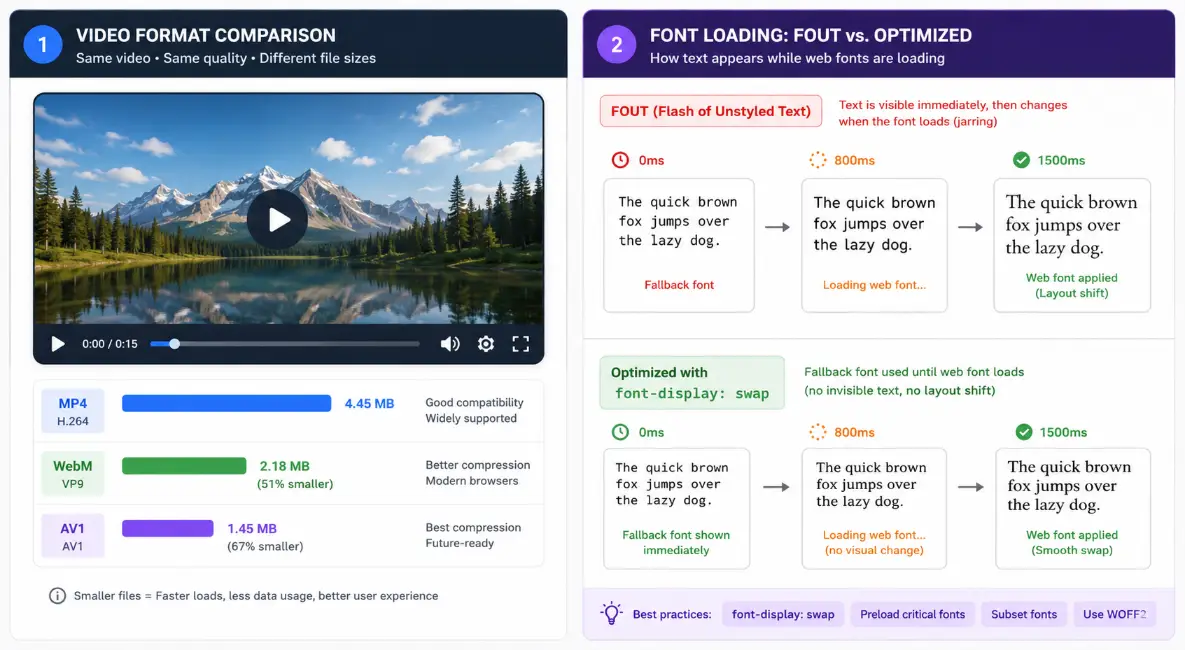
Two often-overlooked performance killers are unoptimized video files and poorly loaded web fonts.
For videos:
- Host videos on YouTube, Vimeo, or Cloudflare Stream instead of self-hosting — let them handle the bandwidth and encoding.
- If you must self-host, convert to AV1 format — it's 30–50% smaller than H.264/MP4 with the same quality.
- Always use a poster image and add
preload="none"so videos don't start loading until needed.
For fonts:
- Host your web fonts locally instead of relying on Google Fonts — this saves a DNS lookup and connection.
- Use
font-display: swapin your CSS to prevent invisible text while fonts load. - Subset your fonts — only include the characters you actually use (e.g., Latin only if your site is English).
- Limit yourself to 2 font families maximum per page.
These two optimizations together can easily shave another 1–2 seconds off your load time.
Final Thoughts
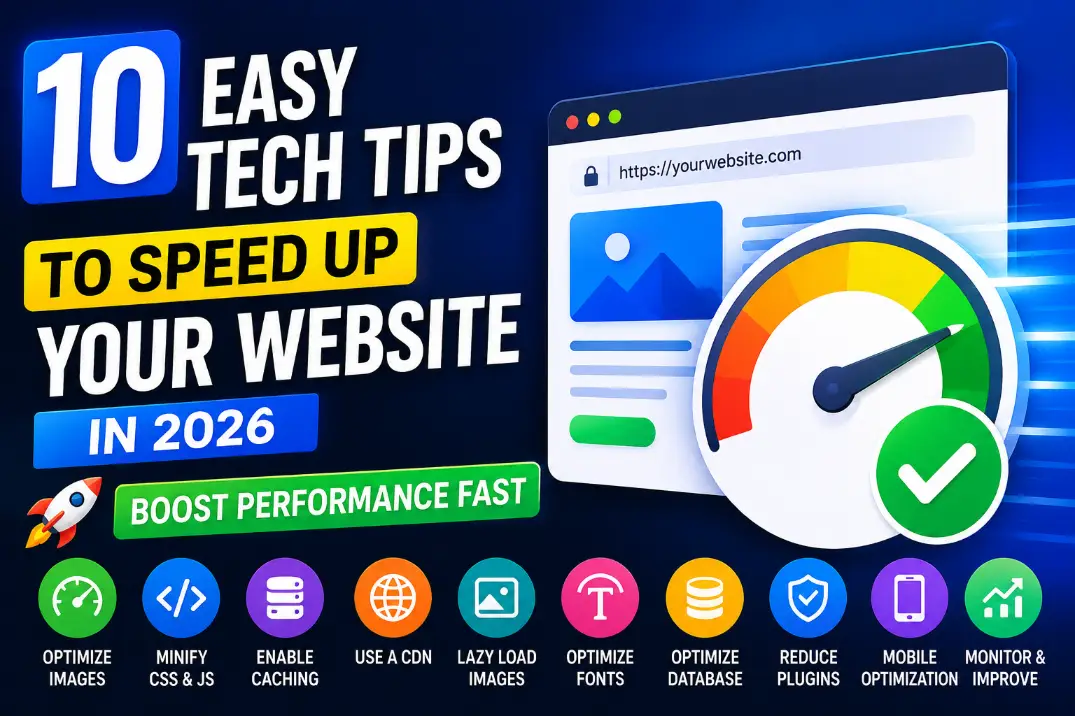
Speeding up your website in 2026 doesn't require a computer science degree or a massive budget. By working through this checklist — better hosting, caching, image compression, a CDN, minification, reduced requests, lazy loading, HTTP/3, database cleanup, and smart media handling — you can achieve dramatic improvements that directly translate into better search rankings, lower bounce rates, and higher conversions.
Start with the quick wins: image optimization, lazy loading, and enabling a CDN. These three alone can cut your load time in half. Then work through the rest systematically, testing your speed before and after each change using Google PageSpeed Insights, GTmetrix, or WebPageTest.